On November 10, 2026, iFixit published its teardown of Apple's first touchscreen MacBook, the 14-inch MacBook Pro with PROLED XDR display, and gave it a repairability score of 5 out of 10.
Key takeaways
- iFixit scored the touchscreen MacBook Pro 5 out of 10 for repairability, one point better than its score for last year's M5 MacBook Pro and one point below the cheaper MacBook Neo.
- The display is replaceable as a whole lid assembly, but iFixit cracked the OLED panel when it tried to separate the glass, and the new glowing logo's LEDs sit behind that panel.
- Apple's Repair Assistant accepted a swapped logic board with the touchscreen and Touch ID working, a meaningful improvement over the parts-pairing problems iFixit saw last year.
- Fans, USB-C ports and the headphone jack still require removing the logic board, and memory, storage, HDMI and the SD card reader are soldered.
- For consumer product design teams, the lesson is that repair access is decided by architecture early in a program, long before anyone writes a repair guide.
What the touchscreen MacBook Pro teardown means for consumer product design
A teardown is one of the few public, evidence-based looks at how a major brand traded off weight, cost, features and serviceability. Repairability is also moving from a nice-to-have toward a regulated requirement in some markets, so these tradeoffs matter to every team shipping electronics, appliances or personal care devices. Below we separate what iFixit and others reported from our own analysis.
What was reported
The product. According to iFixit, this is the first touchscreen MacBook. It uses a tandem OLED panel, meaning two light-emitting layers stacked so each can run at lower current for the same brightness, rated at 120 Hz and a 2,000-nit peak. iFixit weighed it at 1.38 kg (about three pounds), 170 grams lighter than the 14-inch M6 MacBook Pro. The Register notes Apple unveiled the machine at the end of October.
The display and lid. The display comes off as one lid assembly, and iFixit said that path is just as easy as last year, with streamlined display cable brackets and no separate lid-angle sensor. When iFixit tried to remove the panel alone, the glass delaminated and cracked the OLED and touch layers beneath it.
The glowing logo. Because OLED pixels make their own light, there is no backlight to shine through the Apple logo. Apple added a strip of four LEDs behind the display, with a reflective layer and diffuser that spread light evenly behind a mirror-coated logo. iFixit called reaching it "an insane repair path."
Parts pairing. Parts pairing is when software ties a component, such as a screen or fingerprint sensor, to one specific logic board, so a replacement may not work fully without the manufacturer's approval. iFixit swapped logic boards between two of the new laptops. Apple's Repair Assistant recognized the battery, display and Touch ID sensor, the touchscreen worked without separate calibration, and Touch ID enrolled a fingerprint. Last year, iFixit said, Repair Assistant could not finish calibrating Touch ID on its M5 MacBook Pro.
What stayed hard. The fans and the USB-C ports sit under the logic board, the main circuit board that holds the processor. The USB-C ports are on their own small boards, but each has to tilt to clear the case, and the logic board is in the way. The headphone jack's second screw is also under the board. HDMI, the SD card reader and storage are soldered to the board, and memory is integrated with the chip. The battery still uses stretch-release pull tabs, which iFixit found hard to remove in one piece. On the Pro, the keyboard is built into the aluminum top case, while the MacBook Neo's keyboard can be replaced on its own.
Where the weight went. iFixit put parts on a scale. The lower chassis including the bottom cover weighed 364 grams versus 456 grams on the M6, and the display assembly weighed 384 grams versus 485, even with the touch layer and logo lighting. The 72.6 Wh battery weighed 276 grams, nearly the same as the M6's. The speakers got heavier, 39 grams versus 29.
What comes next. iFixit said its laptop scorecard will deduct more for soldered memory starting in 2027, and under that rubric this machine would score a 4. It also noted Apple had not yet posted parts for this model on its Self-Service Repair site.
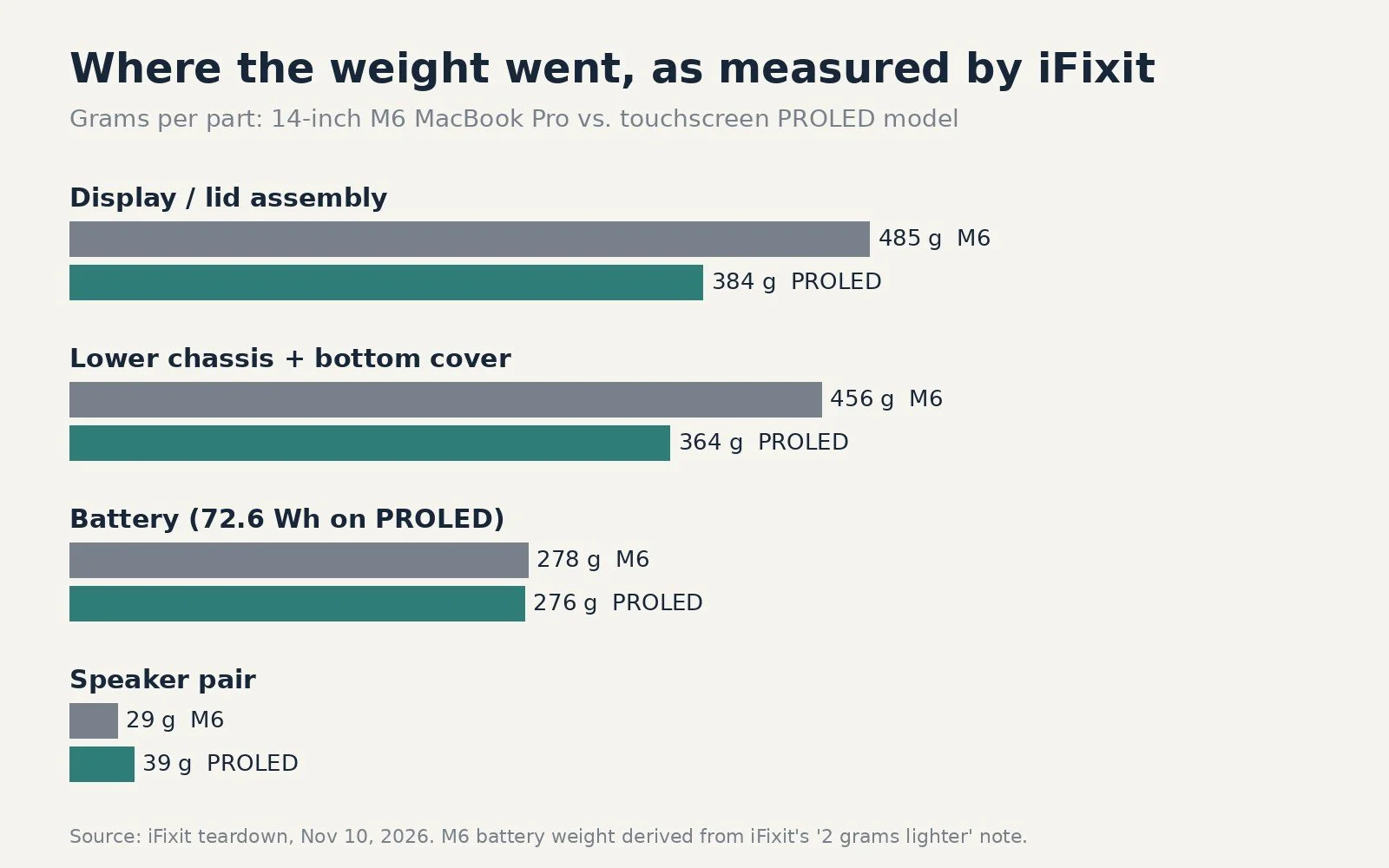
Part weights as reported in iFixit's November 10, 2026 teardown, charted by Jackson Hedden. M6 battery weight derived from iFixit's note that the PROLED pack is 2 grams lighter.
Our analysis: repairability is an architecture decision
The most useful thing about this teardown is that it shows which decisions improved repair and which did not, and how different their cost is to change.
Software was the cheap fix. The parts-pairing improvement came from Repair Assistant behaving better, not from new hardware. For connected products, how firmware authenticates replacement parts can decide whether an independent repair works at all. Teams should define, early, which parts need security pairing (a fingerprint sensor may) and which do not (a speaker almost never does), and design the service software to accept genuine replacements without a factory trip.
Layout is the expensive fix. Fans and USB-C ports have been buried under the logic board across several generations. Once a board outline, thermal path and port positions are set, moving a wear part out from under the board means re-laying out the board, chassis and thermal system. In practice, the stacking order of components is fixed around the EVT stage (engineering validation test, the first builds on production-intent design). If serviceability is not a requirement before that, it rarely gets added later.
Lightness and repairability pull in opposite directions, but not always. Apple saved about 100 grams in the lid while adding a touchscreen. Lamination, thinner structures and adhesives often save weight and thickness, but they also make single components impossible to remove without damage. The design question is not "glue or screws" in general. It is which parts are likely to fail, how often, and what it costs the user if the smallest replaceable unit is an entire lid.
Decorative features need a repair plan too. The backlit logo is a clear example of a feature added late in priority order, with its service path left as an afterthought. Any lighting, haptic or sensor feature that sits behind a laminated surface should have a defined answer to "what happens when this fails?"
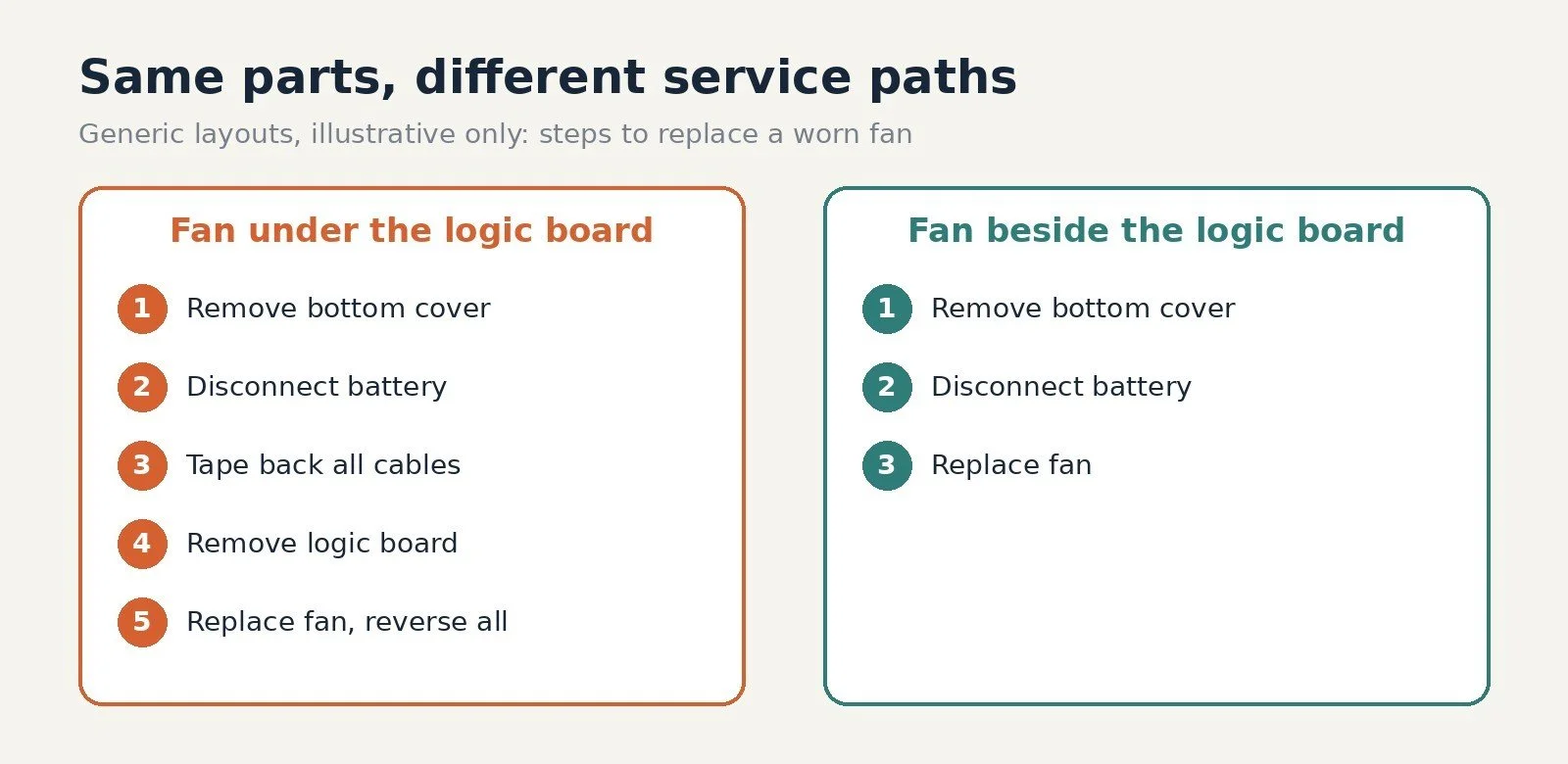
How layout changes the service path. Generic, illustrative layouts by Jackson Hedden; not a repair guide for any specific product.
What this means for product teams
You do not need Apple's volume for these lessons to apply. Whether you are developing a laptop accessory, a countertop appliance or a personal care device, a practical sequence looks like this.
- Rank your wear parts. List the components most likely to fail or wear out, such as batteries, fans, ports, buttons, seals and hinges, and estimate how often. These are the parts that need the shortest path to removal.
- Map the service path before layout freeze. For each wear part, count how many other parts must come off first. If a cheap, common failure requires removing the most expensive board, change the layout while it is still a CAD change.
- Choose the smallest sensible replaceable unit. Replacing a whole module, like Apple's lid, can be a reasonable compromise. Decide it deliberately and price that module, rather than discovering it after launch.
- Prefer reversible fasteners and adhesives where failure is likely. Screws, clips and debondable adhesives cost a little more in assembly time than permanent glue, but they protect warranty and repair costs later. This is where design for manufacturing (DFM, designing parts to be made and assembled efficiently) and design for service have to be balanced together.
- Plan firmware for part replacement. Decide which parts require pairing and build a calibration step a technician can run.
- Watch regulation. The European Commission opened a consultation on November 3, 2026 on horizontal repairability rules covering spare parts, repair information, firmware and easier disassembly for products such as wearables, peripherals and small household appliances. We covered it in what the EU repairability consultation means for product teams. Building serviceability into early architecture is part of good consumer product design, alongside the manufacturing tradeoffs we discussed in the Beni camera robot's path from Kickstarter to retail.
Frequently asked questions
What is a repairability score? A repairability score rates how easy a product is to fix, usually based on how hard key parts are to reach and remove, the tools needed, and whether parts and repair information are available. iFixit publishes its own scores, and France already requires a repairability index for some products.
What is parts pairing, and why does it matter for repair? Parts pairing links a component to a specific device through software, so a replacement part may lose features or stop working unless the manufacturer's tool approves it. It can protect security features like fingerprint sensors, but it can also block independent repairs.
Does designing for repair make a product heavier or more expensive? Sometimes slightly, because fasteners and removable modules can add weight or assembly time. The cost is usually smallest when serviceability is planned before the layout is frozen, and the savings show up later in warranty, returns and regulatory compliance.
When should repairability be considered in product development? At the architecture stage, before the board layout and enclosure design are frozen. By the time engineering validation builds exist, moving a wear part to an accessible position often means redesigning the board, chassis and tooling.
If you are developing a consumer device and want serviceability designed in from the start, see our consumer product design services or contact our team to review your architecture before layout freeze.
Jackson Hedden is a product design, development and manufacturing firm helping founders and product teams take consumer and industrial products from concept to production.
Sources
- iFixit, "We Tore Down the MacBook PROLED XDR and Found the Secret of the Glowing Apple," November 10, 2026: https://www.ifixit.com/News/120152/we-tore-down-the-macbook-proled-xdr-and-found-the-secret-of-the-glowing-apple
- The Register, "Apple's touchscreen MacBook Pro does not like to be taken apart," November 11, 2026: https://www.theregister.com/personal-tech/2026/11/11/apples-touchscreen-macbook-pro-does-not-like-to-be-taken-apart/5309110
- MacRumors, "iFixit's PROLED MacBook Pro Teardown Reveals Logo LEDs," November 10, 2026: https://www.macrumors.com/2026/11/10/ifixit-proled-macbook-pro-teardown/
- European Commission, DG Environment, "Commission launches consultation on easier product repairs," November 3, 2026: https://environment.ec.europa.eu/news/commission-launches-consultation-easier-product-repairs-2026-11-03_en